익스클루시브
Surface <mv-surface-layer>
어떤 요소에든 적용하는 GPU 재질 시스템입니다: data-mv-surface="glass | chrome | jelly | velvet | holo".
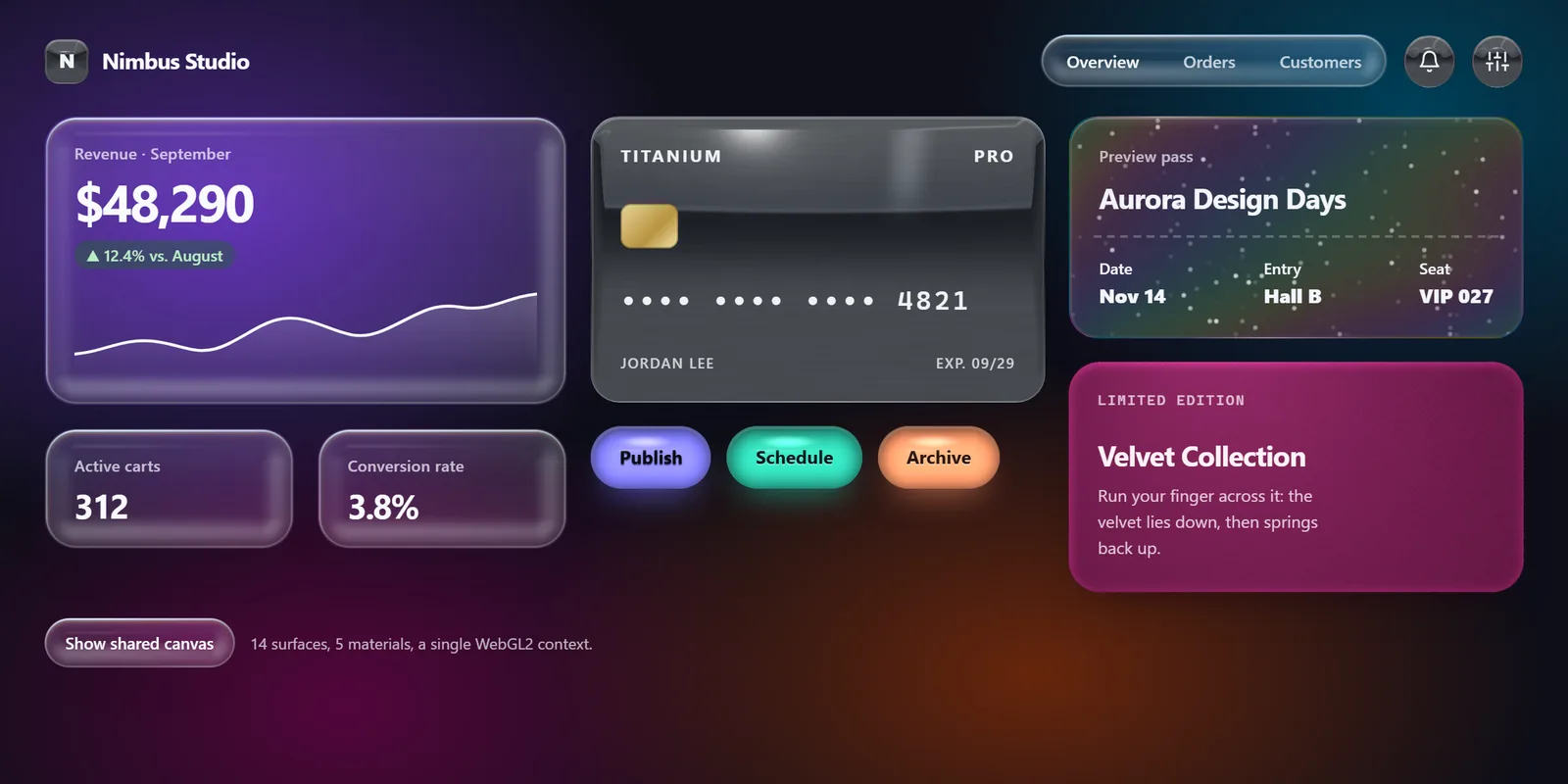
작동 방식
모든 요소를 위한 GPU 재질 시스템: data-mv-surface="glass | chrome | jelly | velvet | holo". 단일 WebGL2 컨텍스트가 모든 surface를 한 번의 인스턴스 드로 콜(공유 아틀라스)로 렌더링하며, 각 surface는 border-radius에서 읽어 온 둥근 모서리 SDF로 잘립니다. 포인터를 따라가는 스페큘러 하이라이트, chrome의 스튜디오 반사, 클릭하면 스프링처럼 출렁이는 jelly, 손가락 아래에서 눕는 velvet, 반짝이는 홀로그램 호일. 수십 개의 요소, 하나의 컨텍스트, 재질별 CSS 대체 수단.
| 카테고리 | 효과 |
|---|---|
| 유형 | Web Component (<mv-surface-layer>) |
| 상태 | 안정 |
| Keywords | exclusive, webgl, material, glass, chrome, jelly, velvet, holographic, sdf, instancing, atlas, pointer |
When to use
- Buttons, cards or tiles need tactile materials like chrome, jelly, velvet or holographic foil
- Many elements on one page need pointer-reactive specular lighting from a single WebGL context
- A playful landing or product showcase should react to clicks with a springy jelly wobble
Avoid when
- A static frosted panel over a background is enough, with no WebGL → use Glass instead
- The interface is a dense data app where decorative GPU materials distract and drain battery
설치
node scripts/add.mjs surface --out ./src/marvelousMarvelous UI MCP 서버를 사용하는 AI 에이전트: install_components({ slugs: ["surface"], target_dir: "<absolute path>/src/marvelous", framework: "react" }).
복사되는 파일(의존성 포함): tokens/tokens.css, core/base.css, core/canvas.js, core/dom.js, core/element.js, core/motion.js, core/webgl.js, components/surface/surface.js, components/surface/surface.css.
사용법
기본 마크업입니다. 여기서 시작해 속성, data-*, CSS 변수로 커스터마이즈하세요:
<div id="sf-demo" class="sf-demo">
  <style>
    .sf-demo {
      --sf-bg1: light-dark(oklch(0.78 0.16 300), oklch(0.36 0.14 295));
      --sf-bg2: light-dark(oklch(0.84 0.13 205), oklch(0.34 0.1 220));
      --sf-bg3: light-dark(oklch(0.88 0.13 75), oklch(0.36 0.1 40));
      --sf-bg4: light-dark(oklch(0.82 0.14 350), oklch(0.3 0.12 345));
      position: relative; min-height: 600px; padding: 26px clamp(16px, 3vw, 34px) 30px; box-sizing: border-box; overflow: hidden;
      background:
        radial-gradient(42% 60% at 14% 26%, var(--sf-bg1), transparent 72%),
        radial-gradient(40% 60% at 90% 14%, var(--sf-bg2), transparent 72%),
        radial-gradient(45% 55% at 66% 86%, var(--sf-bg3), transparent 72%),
        radial-gradient(40% 55% at 22% 90%, var(--sf-bg4), transparent 72%),
        light-dark(oklch(0.97 0.01 280), oklch(0.17 0.02 280));
      color: var(--mv-fg);
      font-family: var(--mv-font-sans);
    }
    .sf-top { display: flex; align-items: center; gap: 12px; flex-wrap: wrap; }
    .sf-brand { display: flex; align-items: center; gap: 10px; font: 750 1.05rem/1 var(--mv-font-sans); letter-spacing: -.02em; margin-right: auto; }
    .sf-logo { width: 34px; height: 34px; border-radius: 11px; display: grid; place-items: center; font: 800 15px/1 var(--mv-font-sans); }
    .sf-nav { display: flex; gap: 6px; padding: 5px; border-radius: 999px; }
    .sf-nav a { padding: 8px 14px; border-radius: 999px; font: 600 13px/1 var(--mv-font-sans); color: inherit; text-decoration: none; opacity: .75; }
    .sf-nav a[aria-current] { opacity: 1; }
    .sf-icon { width: 40px; height: 40px; border-radius: 50%; display: grid; place-items: center; cursor: pointer; padding: 0; }
    .sf-icon svg { width: 18px; height: 18px; }
    .sf-grid { display: grid; grid-template-columns: 1.15fr 1fr 1fr; gap: 18px; margin-top: 22px; }
    @media (max-width: 980px) { .sf-grid { grid-template-columns: 1fr 1fr; } }
    @media (max-width: 640px) { .sf-grid { grid-template-columns: 1fr; } }
    .sf-col { display: grid; gap: 18px; align-content: start; }
    .sf-card { border-radius: 24px; padding: 20px 22px; }
    .sf-label { font: 600 12px/1.2 var(--mv-font-sans); letter-spacing: .02em; opacity: .72; }
    .sf-big { font: 760 2.5rem/1 var(--mv-font-sans); letter-spacing: -.045em; margin-top: 10px; font-variant-numeric: tabular-nums; }
    .sf-delta { display: inline-flex; gap: 6px; align-items: center; margin-top: 10px; font: 600 12px/1 var(--mv-font-sans); padding: 5px 9px; border-radius: 999px; background: light-dark(oklch(0.93 0.08 150 / .7), oklch(0.45 0.1 150 / .45)); color: light-dark(oklch(0.38 0.1 150), oklch(0.9 0.08 150)); }
    .sf-spark { display: block; width: 100%; height: 70px; margin-top: 12px; }
    .sf-mini { display: grid; grid-template-columns: 1fr 1fr; gap: 18px; }
    .sf-mini .sf-big { font-size: 1.6rem; }
    .sf-titane { aspect-ratio: 1.586; border-radius: 22px; padding: 22px; display: flex; flex-direction: column; justify-content: space-between; }
    .sf-titane-top { display: flex; justify-content: space-between; align-items: center; font: 750 13px/1 var(--mv-font-sans); letter-spacing: .14em; text-transform: uppercase; }
    .sf-chip { width: 44px; height: 34px; border-radius: 8px; background: linear-gradient(135deg, #e9d59a, #b8943f 60%, #f1e2ae); box-shadow: inset 0 0 0 1px oklch(0.4 0.05 80 / .45); }
    .sf-number { font: 600 1.25rem/1 var(--mv-font-mono); letter-spacing: .12em; }
    .sf-titane-foot { display: flex; justify-content: space-between; font: 600 11px/1.3 var(--mv-font-sans); letter-spacing: .08em; text-transform: uppercase; opacity: .8; }
    .sf-actions { display: flex; gap: 12px; flex-wrap: wrap; }
    .sf-jelly { border: 0; border-radius: 999px; padding: 0 22px; height: 48px; font: 700 14px/1 var(--mv-font-sans); cursor: pointer; }
    .sf-jelly:focus-visible, .sf-icon:focus-visible, .sf-debug:focus-visible { outline: 2px solid var(--mv-ring); outline-offset: 3px; }
    .sf-ticket { border-radius: 22px; padding: 22px; display: grid; gap: 14px; }
    .sf-ticket h3, .sf-velvet h3 { margin: 0; font: 760 1.35rem/1.1 var(--mv-font-sans); letter-spacing: -.03em; }
    .sf-ticket-row { display: flex; justify-content: space-between; font: 600 12px/1.3 var(--mv-font-sans); }
    .sf-ticket-row b { display: block; font-size: 15px; margin-top: 3px; }
    .sf-perf { border-top: 2px dashed currentColor; opacity: .25; margin: 2px -4px; }
    .sf-velvet { border-radius: 24px; padding: 24px 22px; min-height: 176px; display: flex; flex-direction: column; justify-content: space-between; cursor: crosshair; }
    .sf-velvet p { margin: 8px 0 0; font-size: 13px; opacity: .8; max-width: 26ch; }
    .sf-velvet small { font: 600 11px/1 var(--mv-font-mono); letter-spacing: .1em; text-transform: uppercase; opacity: .75; }
    .sf-foot { display: flex; align-items: center; gap: 12px; margin-top: 20px; flex-wrap: wrap; }
    .sf-debug { border: 0; border-radius: 999px; height: 38px; padding: 0 16px; font: 600 12.5px/1 var(--mv-font-sans); cursor: pointer; color: inherit; }
    .sf-debug[aria-pressed="true"] { font-weight: 750; }
    .sf-note { font-size: 12px; opacity: .7; }
  </style>

  <mv-surface-layer id="sf-layer"></mv-surface-layer>

  <header class="sf-top">
    <div class="sf-brand"><span class="sf-logo" data-mv-surface="chrome" aria-hidden="true">N</span>Nimbus Studio</div>
    <nav class="sf-nav" data-mv-surface="glass" aria-label="Sections">
      <a href="#" aria-current="page">Overview</a><a href="#">Orders</a><a href="#">Customers</a>
    </nav>
    <button class="sf-icon" data-mv-surface="chrome" type="button" aria-label="Notifications">
      <svg viewBox="0 0 24 24" fill="none" stroke="currentColor" stroke-width="2" stroke-linecap="round" stroke-linejoin="round"><path d="M6 8a6 6 0 1 1 12 0c0 7 3 9 3 9H3s3-2 3-9"/><path d="M10.3 21a1.94 1.94 0 0 0 3.4 0"/></svg>
    </button>
    <button class="sf-icon" data-mv-surface="chrome" type="button" aria-label="Settings">
      <svg viewBox="0 0 24 24" fill="none" stroke="currentColor" stroke-width="2" stroke-linecap="round" stroke-linejoin="round"><path d="M4 21v-7M4 10V3M12 21v-9M12 8V3M20 21v-5M20 12V3M1 14h6M9 8h6M17 16h6"/></svg>
    </button>
  </header>

  <div class="sf-grid">
    <div class="sf-col">
      <section class="sf-card" data-mv-surface="glass" aria-label="Revenue">
        <div class="sf-label">Revenue · September</div>
        <div class="sf-big">$48,290</div>
        <span class="sf-delta">▲ 12.4% vs. August</span>
        <svg class="sf-spark" viewBox="0 0 300 70" preserveAspectRatio="none" aria-hidden="true">
          <defs><linearGradient id="sf-fill" x1="0" y1="0" x2="0" y2="1"><stop offset="0" stop-color="currentColor" stop-opacity=".22"/><stop offset="1" stop-color="currentColor" stop-opacity="0"/></linearGradient></defs>
          <path d="M0 52 C20 50 30 40 50 42 S80 56 100 44 130 20 150 26 180 44 200 34 230 12 250 16 280 8 300 6 L300 70 L0 70 Z" fill="url(#sf-fill)"/>
          <path d="M0 52 C20 50 30 40 50 42 S80 56 100 44 130 20 150 26 180 44 200 34 230 12 250 16 280 8 300 6" fill="none" stroke="currentColor" stroke-width="2.2" stroke-linecap="round"/>
        </svg>
      </section>
      <div class="sf-mini">
        <section class="sf-card" data-mv-surface="glass"><div class="sf-label">Active carts</div><div class="sf-big">312</div></section>
        <section class="sf-card" data-mv-surface="glass"><div class="sf-label">Conversion rate</div><div class="sf-big">3.8%</div></section>
      </div>
    </div>

    <div class="sf-col">
      <section class="sf-titane" data-mv-surface="chrome" aria-label="Titanium card">
        <div class="sf-titane-top"><span>Titanium</span><span>Pro</span></div>
        <div class="sf-chip" aria-hidden="true"></div>
        <div class="sf-number">•••• •••• •••• 4821</div>
        <div class="sf-titane-foot"><span>Jordan Lee</span><span>Exp. 09/29</span></div>
      </section>
      <div class="sf-actions">
        <button class="sf-jelly" data-mv-surface="jelly" type="button">Publish</button>
        <button class="sf-jelly" data-mv-surface="jelly" type="button" style="--mv-surface-tint: oklch(0.72 0.13 175); --mv-surface-ink: oklch(0.2 0.03 200); text-shadow: 0 1px 0 oklch(1 0 0 / 0.3)">Schedule</button>
        <button class="sf-jelly" data-mv-surface="jelly" type="button" style="--mv-surface-tint: oklch(0.76 0.14 45); --mv-surface-ink: oklch(0.22 0.04 40); text-shadow: 0 1px 0 oklch(1 0 0 / 0.3)">Archive</button>
      </div>
    </div>

    <div class="sf-col">
      <section class="sf-ticket" data-mv-surface="holo" aria-label="Preview pass">
        <div class="sf-label">Preview pass</div>
        <h3>Aurora Design Days</h3>
        <div class="sf-perf" aria-hidden="true"></div>
        <div class="sf-ticket-row"><div>Date<b>Nov 14</b></div><div>Entry<b>Hall B</b></div><div>Seat<b>VIP 027</b></div></div>
      </section>
      <section class="sf-velvet" data-mv-surface="velvet" aria-label="Velvet Collection">
        <small>Limited edition</small>
        <div><h3>Velvet Collection</h3><p>Run your finger across it: the velvet lies down, then springs back up.</p></div>
      </section>
    </div>
  </div>

  <div class="sf-foot">
    <button class="sf-debug" data-mv-surface="glass" type="button" aria-pressed="false" data-sf-debug>Show shared canvas</button>
    <span class="sf-note">14 surfaces, 5 materials, a single WebGL2 context.</span>
  </div>

  <script type="module">
    const root = document.getElementById("sf-demo");
    const btn = root.querySelector("[data-sf-debug]");
    btn.addEventListener("click", () => {
      const on = btn.getAttribute("aria-pressed") !== "true";
      btn.setAttribute("aria-pressed", String(on));
      btn.textContent = on ? "Hide shared canvas" : "Show shared canvas";
      root.querySelector("#sf-layer").toggleAttribute("debug", on);
    });
  </script>
</div>
API
Attributes
| Name | 유형 | Default | Description |
|---|---|---|---|
data-mv-surface (on any element) | glass | chrome | jelly | velvet | holo | Enables the material; detected automatically (added, removed, value changed). Put it on container elements (not <input>/<img>). | |
dpr | number | 2 | <mv-surface-layer>: maximum atlas density (lowered automatically if it exceeds 4096 px). |
debug | boolean | <mv-surface-layer>: shows the shared canvas (atlas of body + light tiles) and the surface count. | |
animate | boolean | <mv-surface-layer>: continuous rendering (otherwise the loop stops as soon as everything is at rest). | |
data-mv-surface-live | read-only | Set when GPU rendering is active on the element (otherwise only the CSS fallback applies). |
Properties
| Name | Description |
|---|---|
<mv-surface-layer> | Optional: created automatically with the first surface. Placing it yourself lets you set dpr/debug/animate. |
CSS classes
| Name | Description |
|---|---|
mv-surface-body | 2D canvas inserted as the first child, under the content (the material body). |
mv-surface-light | 2D canvas inserted as the last child, above the content (speculars, rims, glitter). |
mv-surface-atlas / -caption | Shared WebGL2 canvas and its caption (visible with debug). |
CSS variables
| Name | Description |
|---|---|
--mv-surface-tint | Material tint, per element (tokens accepted, re-read on theme change). Defaults: white (glass), silver (chrome), accent (jelly), raspberry (velvet), pearl (holo). |
--mv-surface-ink | Text color suited to the material (dark on light chrome/holo, the accent's paired text color on jelly, light on velvet). Set it together with a custom --mv-surface-tint. |
--mv-surface-x / --mv-surface-y | Pointer position on the element (%), used by the CSS fallback. |
Accessibility
Purely decorative: the canvases are aria-hidden and pointer-events: none; the element’s content, focus and semantics stay intact. Keyboard: Enter/Space on a focused element triggers the same reaction as a click (ripple, spring). Reduced motion: no jelly wobble, ripple or velvet trail; lighting still follows the pointer but without inertia. Per-material inks are chosen for contrast (check with your own tints). Without WebGL2 (or with a lost context): a CSS approximation of each material, which also follows the pointer. Forced colors: the painted canvases are hidden and the GPU stops; jelly and velvet keep a system-colored edge. Known limits: two canvases are inserted as the first and last child of each surface (child selectors such as :first-child or :empty in your CSS see them), so it cannot go on void elements (<input>, <img>); the element gets position: relative and isolation: isolate; one MutationObserver on the document, set up on import and kept for the page lifetime, detects data-mv-surface; the shared WebGL2 context counts against the browser context budget and is released when the context pool needs it.